Brand Guideline Prompts Siap Copy
Kumpulan prompt praktis untuk generate berbagai jenis brand guideline dan visual identity board.
Pelajaran 1 2 menit
Logo Design Prompts
Slide 1 / 6
Brand Guideline Prompts
Copy & Paste
You are a senior logo designer and brand identity strategist. Create a premium, professional logo design for the following brand: BRAND INFO - Brand name: [BRAND NAME] - Industry: [INDUSTRY] - Product/service: [WHAT THE BRAND DOES] - Target audience: [TARGET AUDIENCE] - Brand personality: [PREMIUM / FUTURISTIC / CALM / BOLD / MINIMAL / PLAYFUL / LUXURY / TECHNICAL / FRIENDLY] - Desired impression: [WHAT PEOPLE SHOULD FEEL WHEN SEEING THE LOGO] - Avoid style: [TOO CHILDISH / TOO CORPORATE / TOO GENERIC / TOO COMPLEX / TOO COLORFUL / TOO TRENDY] - Logo type preference: [WORDMARK / LETTERMARK / SYMBOL / COMBINATION MARK / EMBLEM / ABSTRACT MARK] - Initials or key letters: [OPTIONAL INITIALS] - Symbol ideas: [OPTIONAL SYMBOL REFERENCES] - Competitor references: [OPTIONAL COMPETITORS] - Visual references: [OPTIONAL STYLE REFERENCES] - Color preference: [OPTIONAL COLOR DIRECTION] OBJECTIVE Design a high-end, memorable, scalable logo that feels commercially usable and brand-ready. The logo must work across digital products, websites, mobile apps, social media, pitch decks, signage, and small icons. LOGO STRATEGY REQUIREMENTS Before designing, infer and apply: 1. The brand’s core identity 2. The emotional direction 3. The most appropriate logo category 4. The visual metaphor behind the mark 5. The reason why the logo shape fits the brand DESIGN REQUIREMENTS - Simple but distinctive - Premium and professional - Easy to recognize at small size - Strong silhouette - Balanced proportions - Clean geometry - Not overly decorative - Avoid generic icons - Avoid clipart feeling - Avoid overly complex gradients - Avoid random symbols with no meaning - Avoid logo marks that only look good in large size LOGO OUTPUT REQUIREMENTS Create a polished logo presentation showing: 1. Primary logo 2. Icon-only logo 3. Horizontal lockup 4. Stacked lockup 5. Monochrome version 6. Reversed dark background version 7. Small-size favicon/app icon test 8. Clear space preview 9. Minimum size preview 10. Logo rationale note VISUAL STYLE - Clean brand identity presentation - White or soft neutral background - Premium spacing - Minimal grid - Strong hierarchy - Modern design studio quality - Commercial, not conceptual FINAL RESULT The final logo should feel like it belongs to a serious brand, not a quick AI-generated concept. It should be refined enough to be used as the foundation of a full brand identity system.
Copy & Paste
You are a senior logo designer. Create a professional logo exploration and concept development board for: BRAND INFO - Brand name: [BRAND NAME] - Industry: [INDUSTRY] - Product/service: [WHAT THE BRAND DOES] - Core concept: [MAIN IDEA BEHIND THE BRAND] - Target audience: [TARGET AUDIENCE] - Desired mood: [PREMIUM / FUTURISTIC / CALM / BOLD / MINIMAL / PLAYFUL / TRUSTWORTHY] - Initials or symbol direction: [INITIALS / ICON / ABSTRACT SYMBOL / OBJECT / LETTERFORM] - Avoid style: [TOO GENERIC / TOO COMPLEX / TOO PLAYFUL / TOO CORPORATE / TOO TRENDY] OBJECTIVE Create a logo development board that shows the design process behind the final logo. The board should feel like a professional agency presentation explaining how the mark was built. CANVAS - Format: 16:9 landscape - Background: clean white or soft off-white - Style: premium technical sketch board - Use thin grid lines, light annotations, and strong layout hierarchy - Use accent color only for key highlights REQUIRED SECTIONS 01. VISUAL KEYWORD ANALYSIS Show 5–7 visual keywords derived from the brand, for example: - Structure - Growth - Intelligence - Flow - System - Speed - Trust - Precision - Creativity 02. SHAPE OPTIONS Explore multiple visual components based on the brand meaning: - Container or frame shapes - Letterform options - Symbol options - Motion/action cues - Product/service cues - Abstract geometry - Negative space experiments - UI/icon-friendly simplifications 03. LETTERFORM EXPLORATION If the brand uses initials, explore: - Individual letter shapes - Connected letterforms - Monogram options - Geometric simplification - Negative-space letter construction - Abstract letter combinations 04. COMBINATION SKETCHES Show 12–24 refined logo sketches. Each sketch should combine different shape ideas: - Letter + symbol - Container + letter - Abstract shape + motion cue - Product cue + brand initial - Negative-space mark - App-icon-friendly mark 05. SELECTED DIRECTION Highlight 1–3 strongest logo directions. Show why they are better: - More memorable - More scalable - More aligned with brand - More distinctive - More usable in UI and social media 06. CONSTRUCTION SYSTEM Show the final logo construction: - Grid - Circles or geometry guides - Proportional guides - Component breakdown - Shape formula - Numbered annotations 07. FINAL MARK Show the polished final logo: - Full-color version - Monochrome version - Small-size version - App icon version - Brand name lockup DESIGN REQUIREMENTS - Make the process look intentional - Do not show too many weak options - Keep the board clean and premium - Use clear labels - Avoid visual clutter - Avoid random decorative shapes - Prioritize a logo that can survive at small sizes FINAL OUTPUT Create one polished logo exploration and construction board that looks like a real design studio deliverable.
Copy & Paste
You are a senior brand identity designer. Refine the uploaded logo into a more premium, balanced, and commercially usable brand mark. BRAND INFO - Brand name: [BRAND NAME] - Industry: [INDUSTRY] - Target audience: [TARGET AUDIENCE] - Desired mood: [PREMIUM / FUTURISTIC / CALM / BOLD / MINIMAL / TRUSTWORTHY] - Current logo issue: [DESCRIBE PROBLEM: TOO COMPLEX / WEAK SILHOUETTE / BAD SPACING / POOR SMALL-SIZE READABILITY / GENERIC / UNBALANCED] - Must preserve: [WHAT MUST STAY FROM CURRENT LOGO] - Can change: [WHAT CAN BE IMPROVED] OBJECTIVE Improve the logo without losing its original identity. Make it cleaner, more balanced, more scalable, and more suitable for real-world brand usage. REFINEMENT REQUIREMENTS Improve: 1. Proportion 2. Geometry 3. Spacing 4. Stroke consistency 5. Visual balance 6. Small-size readability 7. Icon usability 8. Brand distinctiveness 9. Premium feeling 10. Logo lockup composition DO NOT - Do not completely redesign unless necessary - Do not add unnecessary details - Do not make the logo overly trendy - Do not use random gradients - Do not make it look like clipart - Do not make it too complex for app icon usage OUTPUT REQUIREMENTS Show: 1. Original logo reference area 2. Refined primary logo 3. Before/after comparison 4. Icon-only version 5. Horizontal version 6. Monochrome version 7. Small-size test 8. Clear space test 9. Brief visual rationale STYLE - Premium brand studio presentation - Minimal, clean, and professional - Use strong spacing and alignment - Make the improvement obvious but respectful to the original logo
Copy & Paste
You are a senior brand system designer. Create a complete logo usage and variation board for the following brand: BRAND INFO - Brand name: [BRAND NAME] - Industry: [INDUSTRY] - Logo reference: [UPLOADED LOGO OR DESCRIPTION] - Desired mood: [PREMIUM / MINIMAL / FUTURISTIC / BOLD / CALM] - Main use cases: [WEBSITE / APP / SOCIAL MEDIA / PRINT / DASHBOARD / PACKAGING] OBJECTIVE Create a professional logo system board showing how the logo should be used across different contexts. REQUIRED SECTIONS 01. PRIMARY LOGO Show the main logo version with correct spacing and proportions. 02. SECONDARY LOGO Show alternate layouts: - Horizontal lockup - Stacked lockup - Icon-only version - Wordmark-only version if applicable 03. COLOR VARIATIONS Show: - Full-color logo - Single-color dark version - Single-color light version - Reversed version on dark background - Grayscale version 04. BACKGROUND USAGE Show logo on: - White background - Dark background - Brand color background - Image background - Gradient background - Low-contrast background warning 05. CLEAR SPACE Show the minimum safe area around the logo using a consistent measurement unit from the logo itself. 06. MINIMUM SIZE Show logo at: - Large display size - Website navbar size - App icon size - Social avatar size - Favicon size 07. INCORRECT USAGE Show examples of what not to do: - Do not stretch - Do not rotate - Do not change colors randomly - Do not add shadow effects - Do not place on low contrast background - Do not outline the logo - Do not change letter spacing - Do not use old versions 08. REAL APPLICATION PREVIEW Show the logo applied to: - Website navbar - Mobile app header - Social media avatar - Business card - Pitch deck cover DESIGN STYLE - Clean guideline board - Premium spacing - Clear labels - Practical and client-ready
Copy & Paste
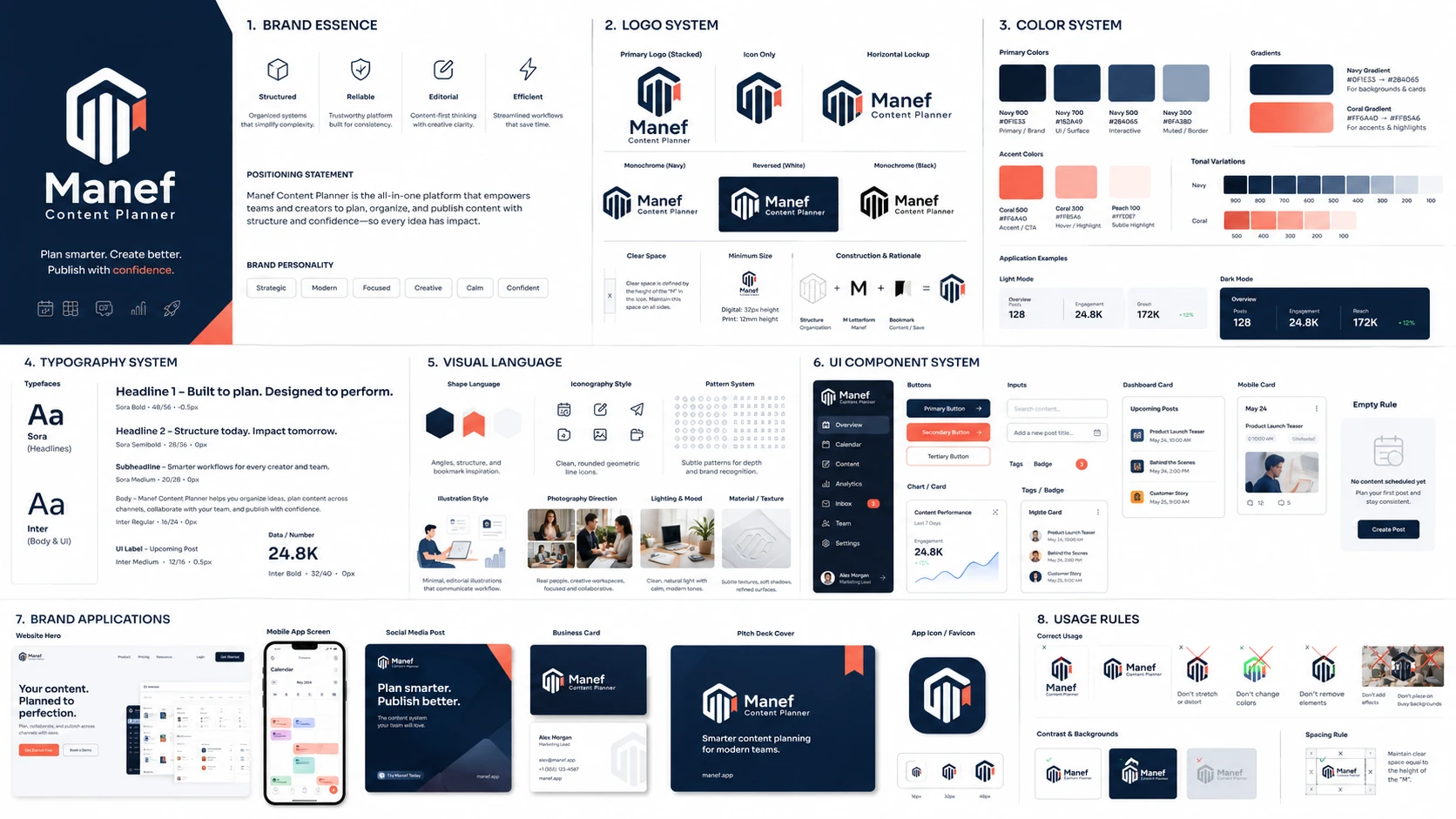
You are a senior brand identity designer and art director. Create a high-end, agency-grade brand guideline board for the following brand: BRAND INFO - Brand name: [BRAND NAME] - Industry: [INDUSTRY] - Product/service: [WHAT THE BRAND DOES] - Target audience: [TARGET AUDIENCE] - Desired mood: [PREMIUM / FUTURISTIC / CALM / BOLD / PLAYFUL / MINIMAL / LUXURY / ETC] - Avoid style: [TOO CHILDISH / TOO CORPORATE / TOO GENERIC / TOO COLORFUL / ETC] - Existing logo reference: [DESCRIBE OR USE UPLOADED LOGO] - Brand keywords: [3–7 KEYWORDS] OBJECTIVE Design a complete, presentation-ready brand guideline board that feels commercial, realistic, premium, and client-deliverable. It should look like a top-tier branding studio case study, not a rough concept. CANVAS - Format: 16:9 landscape - Style: modern editorial, clean grid, premium spacing - Layout: structured brand system board with strong hierarchy - Use realistic mockup sections, not just flat theory REQUIRED SECTIONS 1. BRAND ESSENCE - Show 3–5 identity traits inferred from the logo and brand context - Include short brand positioning statement - Include brand personality keywords 2. LOGO SYSTEM - Show primary logo - Show icon-only version - Show horizontal and stacked versions - Show monochrome and reversed versions - Include clear space and minimum size rules - Include simple logo construction or rationale 3. COLOR SYSTEM Generate a complete color palette: - Primary colors: 3–5 - Secondary colors: 3–5 - Accent colors: 2–3 - Neutral colors: light, dark, surface, border, muted For each color, show: - HEX code - Usage label: primary / UI / background / highlight / text / border Also include: - Gradient combinations - Tonal variations - Light mode and dark mode usage 4. TYPOGRAPHY SYSTEM Choose typography style based on the brand personality: - Luxury brand: elegant serif + refined sans - Tech brand: geometric sans - Editorial brand: modern serif + clean sans - Youth brand: bold expressive type - Enterprise brand: clean neutral sans Show: - Headline style - Subheadline style - Body text style - UI label style - Number/data style Use real brand-relevant text, not lorem ipsum. 5. VISUAL LANGUAGE Define and visualize: - Shape language - Iconography style - Pattern system - Illustration style - Photography direction - Lighting and mood - Texture or material direction if relevant 6. UI COMPONENT SYSTEM Show brand applied to: - Dashboard card - Sidebar - Button - Input field - Notification badge - Chart/card component - Mobile app card - Empty state or onboarding panel 7. BRAND APPLICATIONS Show realistic mockups: - Website hero - Mobile app screen - Social media post - Business card or ID card - Pitch deck cover - App icon / favicon - Dashboard preview 8. USAGE RULES Show: - Correct usage - Incorrect usage - Contrast rule - Background rule - Logo spacing rule DESIGN DIRECTION - Premium but practical - Not overly decorative - Strong spacing and alignment - Clear readable labels - Realistic visual hierarchy - Commercial, client-ready presentation - Avoid clutter - Avoid generic template look - Avoid random colors that do not match the logo OUTPUT STYLE Create one polished brand guideline poster/board. Make it look like a complete identity system that could be delivered to a real client.
Copy & Paste
You are a senior logo designer. Create a professional logo exploration and construction board for: - Brand name: [BRAND NAME] - Industry: [INDUSTRY] - Core concept: [MAIN CONCEPT] - Logo initials or symbol: [INITIALS / SYMBOL] - Desired mood: [PREMIUM / FUTURISTIC / CALM / BOLD / ETC] OBJECTIVE Create a clean, systematic logo development board showing how the final brand mark was created from visual components. CANVAS - Format: 16:9 landscape - Style: technical but premium - Background: clean white or soft off-white - Use thin grid lines, precise spacing, and editorial section labels SECTIONS 01. SHAPE OPTIONS Explore multiple visual components: - Container shape options - Structural symbol options - Product/service cue options - Notification or action cue options - Content/page/icon options - Letterform explorations 02. COMBINATION SKETCHES Show 12–24 small logo combination sketches. Each sketch should combine different elements from the shape options. Use a refined pencil/wireframe style. 03. CONSTRUCTION Show the selected final logo construction: - Break logo into individual components - Show formula: component + component + component = final mark - Add numbered annotations explaining each part - Add proportional guide lines and construction circles 04. FINAL LOGO Show the final polished logo mark with: - Brand name - Small descriptor/tagline - Primary color version - Optional monochrome version DESIGN REQUIREMENTS - Make the process look intentional, not random - Use clean labels - Use red or accent color only for highlights - Use navy/dark gray for final logo - Keep spacing premium and readable - Avoid overcrowding - Make it feel like a real agency presentation board
Brand Mockup Prompts
Slide 1 / 6
Master Brand Mockup Prompt
Copy & Paste
You are a senior brand identity designer and mockup art director. Create a premium brand mockup presentation for the following brand: BRAND INFO - Brand name: [BRAND NAME] - Industry: [INDUSTRY] - Product/service: [WHAT THE BRAND DOES] - Target audience: [TARGET AUDIENCE] - Brand mood: [PREMIUM / FUTURISTIC / CALM / BOLD / MINIMAL / LUXURY / PLAYFUL] - Logo reference: [UPLOADED LOGO OR DESCRIPTION] - Color palette: [HEX COLORS OR COLOR DIRECTION] - Typography direction: [SERIF / SANS / GEOMETRIC / EDITORIAL / CONDENSED / HUMANIST] - Mockup focus: [DIGITAL / PRINT / SOCIAL / PACKAGING / OFFICE / APP / WEBSITE / FULL BRAND LAUNCH] OBJECTIVE Create a high-end, realistic brand mockup board showing how the brand identity works in real-life applications. The mockups should feel commercial, polished, and client-deliverable. CANVAS - Format: 16:9 landscape - Style: premium brand presentation board - Use realistic mockups, strong lighting, and clean composition - Use editorial spacing and a structured grid - Avoid clutter - Avoid fake or overly decorative elements REQUIRED MOCKUP SECTIONS 01. HERO BRAND APPLICATION Create a strong hero area showing: - Primary logo - Brand tagline - Main visual direction - Premium composition - Clear brand mood 02. WEBSITE MOCKUP Show the brand applied to a website homepage: - Navbar - Hero section - CTA button - Brand typography - Brand colors - Product/service preview 03. MOBILE APP OR RESPONSIVE SCREEN Show: - Mobile app splash screen - App header - Brand icon - Key card/component - Bottom navigation if relevant 04. SOCIAL MEDIA MOCKUP Show: - Instagram/LinkedIn post preview - Carousel cover - Story/reel cover - Profile avatar - Strong mobile readability 05. PRINT COLLATERAL Show: - Business card - Letterhead - Envelope - ID card or membership card - Document cover 06. PRESENTATION MOCKUP Show: - Pitch deck cover - Section divider slide - Data/content slide preview - Premium typography hierarchy 07. ENVIRONMENTAL OR PHYSICAL MOCKUP Depending on brand type, show: - Signage - Office wall - Storefront - Product packaging - Uniform - Tote bag - Notebook - Sticker - Event banner 08. UI COMPONENT MOCKUP For digital brands, show: - Dashboard card - Button - Sidebar - Notification - Chart card - Empty state - AI assistant panel if relevant DESIGN REQUIREMENTS - Realistic scale - Consistent brand application - Premium lighting - Clean shadows - Strong alignment - Not too crowded - Every mockup must feel usable in real business context - Maintain logo integrity - Use brand colors consistently - Keep typography readable AVOID - Random mockups unrelated to the brand - Overly generic stationery-only layout - Too many decorative objects - Unrealistic UI - Weak logo placement - Inconsistent color usage - Overcrowded composition - Fake text blocks that dominate the design FINAL OUTPUT Create one complete premium brand mockup board that looks like a professional Behance case study or agency client presentation.
Copy & Paste
You are a senior product designer and brand mockup art director. Create a premium digital product brand mockup board for: BRAND INFO - Brand name: [BRAND NAME] - Product type: [SAAS / DASHBOARD / AI TOOL / ERP / CMS / MOBILE APP / WEB APP] - Industry: [INDUSTRY] - Target users: [TARGET USERS] - Logo reference: [UPLOADED LOGO OR DESCRIPTION] - Brand mood: [PREMIUM / FUTURISTIC / TRUSTWORTHY / CALM / FAST / INTELLIGENT] - Color palette: [HEX COLORS OR COLOR DIRECTION] - UI style: [MINIMAL / GLASSMORPHISM / ENTERPRISE / IOS-LIKE / BENTO / EDITORIAL / FUTURISTIC] OBJECTIVE Create realistic digital product mockups that show how the brand identity works inside a real software interface. CANVAS - Format: 16:9 landscape - Style: premium SaaS product showcase - Use desktop and mobile screens - Use realistic UI, not decorative fake UI - Strong hierarchy and spacing REQUIRED MOCKUPS 01. DESKTOP DASHBOARD Show: - Sidebar with brand logo - Brand switcher or workspace switcher - Top navigation - KPI cards - Data table - Chart card - Activity feed - AI assistant panel - Notification badge 02. MOBILE APP UI Show: - Splash screen - Home screen - Workspace switcher - Quick actions - Bottom navigation - Main cards - Floating AI assistant button 03. WEBSITE HERO Show: - Landing page hero - Product screenshot - CTA buttons - Social proof area - Feature cards 04. AUTHENTICATION SCREEN Show: - Login page - Brand icon - Clean form - Trust/security message - Premium background 05. EMPTY STATE / ONBOARDING Show: - Welcome screen - Setup checklist - Empty dashboard state - Helpful illustration or icon 06. NOTIFICATION / SYSTEM PANEL Show: - Alerts - Status badges - Task cards - Message preview - AI recommendation card 07. RESPONSIVE SHOWCASE Show the same product identity across: - Desktop - Tablet - Mobile DESIGN REQUIREMENTS - High-end SaaS look - Practical UI components - Strong spacing - Clear typography - Realistic product structure - Brand colors used intentionally - Avoid overdecorated futuristic UI - Avoid unreadable tiny text - Make it feel buildable in Next.js/Tailwind/shadcn-style UI FINAL OUTPUT Create one polished digital product mockup board that can be used in a brand guideline, landing page, or investor pitch deck.
Copy & Paste
You are a senior brand identity designer. Create a premium stationery and print collateral mockup board for: BRAND INFO - Brand name: [BRAND NAME] - Industry: [INDUSTRY] - Logo reference: [UPLOADED LOGO OR DESCRIPTION] - Brand mood: [PREMIUM / MINIMAL / LUXURY / CALM / CORPORATE / CREATIVE] - Color palette: [HEX COLORS OR COLOR DIRECTION] - Typography direction: [SERIF / SANS / GEOMETRIC / EDITORIAL] OBJECTIVE Create a professional stationery mockup system that shows the brand applied to real business materials. REQUIRED MOCKUPS 1. Business card front and back 2. Letterhead 3. Envelope 4. ID card 5. Document folder 6. Invoice or proposal cover 7. Notebook 8. Sticker or label 9. Presentation cover 10. Brand stamp or seal if relevant DESIGN REQUIREMENTS - Premium minimal composition - Realistic paper texture - Clean shadows and lighting - Consistent logo placement - Strong use of whitespace - Elegant typography - Commercial and client-ready - Avoid generic free-template look FINAL OUTPUT Create one polished stationery brand mockup board suitable for a brand guideline presentation.
Copy & Paste
You are a senior social media brand designer and art director. Create a premium social media mockup board for: BRAND INFO - Brand name: [BRAND NAME] - Platform focus: [INSTAGRAM / LINKEDIN / TIKTOK / X / YOUTUBE] - Industry: [INDUSTRY] - Target audience: [TARGET AUDIENCE] - Content pillars: [LIST CONTENT PILLARS] - Logo reference: [UPLOADED LOGO OR DESCRIPTION] - Brand mood: [PREMIUM / BOLD / EDUCATIONAL / MINIMAL / HIGH-CONTRAST / PLAYFUL] - Color palette: [HEX COLORS OR COLOR DIRECTION] OBJECTIVE Create reusable social media mockups that show how the brand appears across daily content production. REQUIRED MOCKUPS 1. Profile page preview 2. Profile avatar 3. Instagram post template 4. Carousel cover 5. Carousel inner slide 6. Quote card 7. Educational post 8. Reel cover 9. Story template 10. CTA post 11. Announcement post 12. Case study post DESIGN REQUIREMENTS - Mobile-first readability - Big typography - Short text blocks - Strong contrast - Consistent template structure - Easy to reuse daily - Not too crowded - Avoid tiny text - Avoid generic Canva-template look - Make every post readable in 1–2 seconds FINAL OUTPUT Create one professional social media mockup board that can be used as a production-ready content identity system.
Copy & Paste
You are a senior social media brand designer. Create a social media brand guideline board for: - Brand name: [BRAND NAME] - Platform focus: [Instagram / LinkedIn / TikTok / X / YouTube] - Audience: [TARGET AUDIENCE] - Content pillars: [LIST CONTENT PILLARS] - Desired mood: [BOLD / PREMIUM / EDUCATIONAL / FUN / MINIMAL / HIGH-CONTRAST] - Logo reference: [UPLOADED LOGO OR DESCRIPTION] OBJECTIVE Create a practical social media identity system that can be used repeatedly for content production. REQUIRED SECTIONS 1. Profile identity 2. Color system 3. Typography system 4. Post layout styles 5. Carousel template 6. Reel cover style 7. Quote card style 8. Educational post style 9. CTA style 10. Do and don’t examples DESIGN REQUIREMENTS - Mobile-first readability - Big typography - Short text blocks - Strong hierarchy - Consistent templates - Easy to reuse - Not too crowded - Realistic for daily content production
Copy & Paste
You are a senior product designer and brand system designer. Create a UI-focused brand guideline board for: - Brand name: [BRAND NAME] - Product type: [DASHBOARD / SAAS / MOBILE APP / ERP / CMS / AI TOOL] - Target users: [TARGET USERS] - Desired UI mood: [PREMIUM / FAST / TRUSTWORTHY / PLAYFUL / FUTURISTIC / CALM] - Logo reference: [UPLOADED LOGO OR DESCRIPTION] OBJECTIVE Create a complete UI brand system showing how the brand identity translates into a real digital product. CANVAS - Format: 16:9 landscape - Style: premium SaaS design system board - Use realistic dashboard and mobile UI mockups REQUIRED SECTIONS 1. PRODUCT IDENTITY - Brand traits - UI personality - Product positioning 2. COLOR TOKENS Show: - Background - Foreground - Card - Border - Primary - Secondary - Accent - Muted - Success - Warning - Error - Chart colors Include HEX codes and usage labels. 3. TYPOGRAPHY TOKENS Show: - Display - Page title - Section title - Body - Caption - Button label - Data/number style 4. COMPONENT SYSTEM Show: - Button states - Input field - Select/dropdown - Card - Sidebar item - Tab - Badge - Notification - Table row - Chart card - Empty state 5. DASHBOARD APPLICATION Show a polished dashboard screen with: - Sidebar - Top bar - Brand switcher - KPI cards - Table/list - Chart - Activity feed - AI assistant panel 6. MOBILE APP APPLICATION Show a mobile app version with: - App header - Bottom navigation - Workspace switcher - Cards - Quick actions - AI assistant button 7. DESIGN RULES Show: - Border radius system - Spacing system - Shadow system - Icon style - Motion/micro-interaction direction DESIGN STYLE - High-end SaaS - Clean spacing - Strong hierarchy - Light and dark mode friendly - Practical enough for real implementation - Avoid fake decorative UI
Copywriting & Tone of Voice Prompts
Slide 1 / 5
Master Brand Voice Prompt
Copy & Paste
You are a senior brand strategist, copywriter, and tone-of-voice designer. Create a complete copywriting and tone of voice system for the following brand: BRAND INFO - Brand name: [BRAND NAME] - Industry: [INDUSTRY] - Product/service: [WHAT THE BRAND DOES] - Target audience: [TARGET AUDIENCE] - Brand positioning: [HOW THE BRAND WANTS TO BE KNOWN] - Brand personality: [PREMIUM / FRIENDLY / BOLD / CALM / EXPERT / PLAYFUL / FUTURISTIC / TRUSTWORTHY] - Desired customer feeling: [WHAT THE AUDIENCE SHOULD FEEL] - Avoid tone: [TOO SALESY / TOO CORPORATE / TOO CHILDISH / TOO TECHNICAL / TOO HYPE / TOO DRY] - Main offer: [CORE OFFER] - Main pain point solved: [CUSTOMER PROBLEM] - Main transformation: [BEFORE → AFTER] OBJECTIVE Create a complete verbal identity system that makes the brand sound consistent across website, social media, ads, product UI, emails, pitch decks, and customer communication. REQUIRED SECTIONS 01. BRAND VOICE SUMMARY Define the brand voice in 3–5 words. Example: - Clear - Confident - Helpful - Premium - Human For each trait, explain: - What it means - How it sounds - What to avoid 02. BRAND PERSONALITY Define: - If the brand were a person, how would it speak? - What kind of energy should it have? - What kind of relationship should it build with the audience? - What should people remember after reading the brand copy? 03. TONE SCALE Create a tone scale for different situations: - Website headline - Product explanation - Social media caption - Error message - Customer support - Sales page - Investor pitch - Educational content For each, define: - Tone level - Example sentence - Do/don’t rule 04. MESSAGING PILLARS Create 4–6 messaging pillars. For each pillar, include: - Pillar name - Core message - Audience pain point - Brand promise - Example headline - Example caption - Example CTA 05. VALUE PROPOSITION Create: - One short value proposition - One medium value proposition - One detailed value proposition - One emotional version - One practical version - One premium/business version 06. TAGLINE OPTIONS Generate: - 10 short taglines - 10 premium taglines - 10 practical taglines - 10 bold taglines - 10 emotional taglines Taglines should be: - Memorable - Short - Brand-relevant - Not generic - Not cliché 07. HEADLINE SYSTEM Create headline formulas for: - Website hero - Feature section - Problem section - Benefit section - Social media post - Ad creative - Email subject - Pitch deck cover For each formula, include: - Structure - Example - When to use it 08. COPY EXAMPLES Write sample copy for: - Website hero section - About section - Feature section - CTA section - Social media bio - LinkedIn post - Instagram carousel cover - Email intro - App onboarding message - Error message - Success message - Empty state message 09. MICROCOPY SYSTEM Create microcopy examples for: - Buttons - Forms - Search field - Empty states - Loading states - Success messages - Warning messages - Error messages - Tooltips - Upgrade prompts - Confirmation modals 10. DO AND DON’T Create a tone of voice rule table: - Say this - Not this - Why - Better alternative 11. WORD BANK Create: - Words to use often - Words to use carefully - Words to avoid - Phrases that fit the brand - Phrases that do not fit the brand 12. BRAND STORY Write: - Short brand story - Founder-style story - Customer-focused story - Pitch deck version - Social media bio version OUTPUT STYLE - Practical - Specific - Not generic - Ready to use - Clear examples - No vague branding jargon - Make the voice feel unique to the brand
Copy & Paste
You are a senior conversion copywriter and brand strategist. Create complete website copy for the following brand: BRAND INFO - Brand name: [BRAND NAME] - Website type: [LANDING PAGE / COMPANY WEBSITE / SAAS WEBSITE / PERSONAL BRAND / AGENCY WEBSITE / PRODUCT WEBSITE] - Industry: [INDUSTRY] - Product/service: [WHAT THE BRAND OFFERS] - Target audience: [TARGET AUDIENCE] - Main customer problem: [PROBLEM] - Main solution: [SOLUTION] - Main transformation: [BEFORE → AFTER] - Brand voice: [PREMIUM / CLEAR / FRIENDLY / BOLD / CALM / EXPERT / FUTURISTIC] - CTA goal: [BOOK A CALL / SIGN UP / BUY / CONTACT / JOIN WAITLIST / DOWNLOAD] - Avoid tone: [TOO SALESY / TOO CORPORATE / TOO HYPE / TOO GENERIC] OBJECTIVE Write clear, persuasive, brand-consistent website copy that can be used directly on a real website. REQUIRED WEBSITE SECTIONS 01. HERO SECTION Create: - 5 headline options - 5 subheadline options - 5 CTA button options - 3 trust badge examples - 1 final recommended hero copy 02. PROBLEM SECTION Write: - Section headline - Problem explanation - 3–5 pain points - Emotional framing - Practical framing 03. SOLUTION SECTION Write: - Section headline - Solution explanation - 3–5 solution points - Why this solution is different 04. FEATURE SECTION Create copy for 4–6 features. For each: - Feature name - Short description - Benefit - Microcopy label 05. BENEFIT SECTION Create 4–6 benefits. For each: - Benefit headline - Explanation - Outcome for the user 06. HOW IT WORKS Create: - 3-step version - 5-step version - Short explanation for each step 07. SOCIAL PROOF SECTION Write: - Testimonial placeholder style - Client/result statement - Case study teaser - Trust-building copy 08. ABOUT SECTION Write: - Short about copy - Founder-led about copy - Premium brand version - Human and friendly version 09. CTA SECTION Create: - CTA headline - CTA subheadline - CTA button - Low-friction supporting text 10. FAQ SECTION Create 8–12 FAQ items with direct answers. 11. FOOTER COPY Create: - Footer tagline - Newsletter copy - Contact CTA - Copyright line style OUTPUT REQUIREMENTS - Use brand-specific language - Avoid generic marketing clichés - Keep sentences clear - Prioritize conversion and trust - Use practical, human language - Make the copy ready for design implementation
Copy & Paste
You are a senior social media strategist and copywriter. Create a complete social media copywriting system for: BRAND INFO - Brand name: [BRAND NAME] - Platform focus: [INSTAGRAM / LINKEDIN / TIKTOK / X / YOUTUBE] - Industry: [INDUSTRY] - Target audience: [TARGET AUDIENCE] - Content pillars: [LIST CONTENT PILLARS] - Brand voice: [BOLD / EDUCATIONAL / PREMIUM / FRIENDLY / DIRECT / CALM / FUN] - Main offer: [OFFER] - Main goal: [AWARENESS / LEADS / COMMUNITY / SALES / AUTHORITY] - Avoid tone: [TOO SALESY / TOO GENERIC / TOO FORMAL / TOO CRINGE] OBJECTIVE Create a reusable social media copy system that helps the brand publish consistent, engaging, and useful content. REQUIRED SECTIONS 01. PROFILE BIO Create: - 10 Instagram bio options - 10 LinkedIn headline options - 10 X/Twitter bio options - 10 TikTok bio options - CTA line options 02. CONTENT PILLAR COPY ANGLES For each content pillar, create: - 10 post ideas - 5 hook styles - 5 caption angles - 5 CTA options - 3 carousel concepts - 3 reel concepts 03. HOOK BANK Generate 100 hooks divided into: - Educational hooks - Contrarian hooks - Story hooks - Pain-point hooks - Transformation hooks - Data/result hooks - Curiosity hooks - Authority hooks - Soft-sell hooks - Community hooks 04. CAPTION FORMULAS Create caption templates for: - Educational post - Carousel post - Before/after post - Personal story - Product explanation - Case study - Client result - Behind the scenes - Opinion post - Announcement - CTA post - Community question 05. CAROUSEL COPY Create 10 carousel structures. For each: - Slide 1 hook - Slide 2 problem - Slide 3 insight - Slide 4 framework - Slide 5 example - Slide 6 takeaway - Slide 7 CTA 06. REEL/TIKTOK SCRIPT Create 10 short video scripts. For each: - Hook - Scene direction - Voiceover - On-screen text - CTA - Suggested duration 07. CTA BANK Generate CTAs for: - Comment - Save - Share - DM - Join waitlist - Book a call - Visit website - Download - Subscribe - Buy - Ask a question 08. HASHTAG STYLE Create: - Branded hashtag ideas - Niche hashtag groups - Campaign hashtag ideas - Rules for hashtag usage 09. COMMENT REPLY STYLE Create example replies for: - Praise - Criticism - Question - Price inquiry - Collaboration inquiry - Confused audience - Negative comment - Lead asking for details 10. CONTENT CALENDAR COPY Create a 30-day content plan with: - Date/day - Content pillar - Post format - Hook - Caption summary - CTA OUTPUT REQUIREMENTS - Make it platform-appropriate - Keep copy short and readable - Avoid generic AI wording - Avoid overused phrases - Make it sound human - Make the system reusable for daily content production
Copy & Paste
You are a senior UX writer and product copywriter. Create a complete UI microcopy system for: PRODUCT INFO - Product name: [PRODUCT NAME] - Product type: [SAAS / DASHBOARD / MOBILE APP / MARKETPLACE / AI TOOL / CMS / ERP] - Target users: [TARGET USERS] - Brand voice: [CLEAR / FRIENDLY / PREMIUM / DIRECT / CALM / PROFESSIONAL / PLAYFUL] - Main user goal: [WHAT USERS WANT TO DO] - Product complexity level: [SIMPLE / MODERATE / COMPLEX] - Avoid tone: [TOO TECHNICAL / TOO CASUAL / TOO CORPORATE / TOO SALESY] OBJECTIVE Create clear, helpful, and consistent UI microcopy that improves user experience across the product. REQUIRED SECTIONS 01. UX WRITING PRINCIPLES Define 5–7 writing principles: - Clarity - Brevity - Action-oriented language - Human tone - Helpful error recovery - Consistent labels - Trust-building copy 02. NAVIGATION LABELS Create labels for: - Dashboard - Workspace - Projects - Tasks - Calendar - Messages - Files - Settings - Billing - Team - Reports - AI Assistant 03. BUTTON COPY Create button labels for: - Primary action - Secondary action - Cancel - Save - Delete - Archive - Publish - Invite - Export - Import - Continue - Back - Retry - Upgrade - Contact support 04. EMPTY STATES Write empty state copy for: - No projects - No tasks - No messages - No files - No search results - No team members - No reports - No notifications - No connected apps - No AI suggestions yet Each empty state should include: - Title - Description - CTA button 05. ERROR MESSAGES Write helpful error messages for: - Login failed - Network error - Form validation - Payment failed - Permission denied - File upload failed - Data not found - Server error - Invalid link - Session expired Each error message should include: - Short title - Clear explanation - Recovery action 06. SUCCESS MESSAGES Write success messages for: - Account created - Settings saved - File uploaded - Invite sent - Project created - Payment successful - Data synced - Message sent - Export completed - Workflow published 07. ONBOARDING COPY Create: - Welcome screen - Setup checklist - First project prompt - Invite team prompt - Connect tools prompt - AI assistant introduction - Completion message 08. MODAL COPY Create copy for: - Delete confirmation - Archive confirmation - Publish confirmation - Invite member - Upgrade plan - Export data - Import data - Unsaved changes warning 09. TOOLTIP COPY Create short tooltips for: - Dashboard metrics - Workspace switcher - Role permissions - AI suggestions - Data sync - Notifications - Billing status - Export button - Privacy setting 10. AI ASSISTANT COPY Create copy for: - AI greeting - Suggested prompts - Loading state - Thinking state - Error response - Permission request - Completed task response - Clarifying question style OUTPUT REQUIREMENTS - Clear and practical - Short enough for UI - Friendly but not childish - Helpful without overexplaining - Consistent with brand voice - Ready for product implementation
Copy & Paste
You are a senior brand strategist and pitch copywriter. Create a complete brand messaging and pitch system for: BRAND INFO - Brand name: [BRAND NAME] - Industry: [INDUSTRY] - Product/service: [WHAT THE BRAND DOES] - Target audience: [TARGET AUDIENCE] - Main problem: [PROBLEM] - Main solution: [SOLUTION] - Main differentiation: [WHY THIS BRAND IS DIFFERENT] - Business model: [HOW IT MAKES MONEY] - Brand voice: [PREMIUM / DIRECT / VISIONARY / PRACTICAL / FRIENDLY / TECHNICAL] - Pitch audience: [CUSTOMERS / INVESTORS / PARTNERS / INTERNAL TEAM] OBJECTIVE Create a messaging system that clearly explains the brand, why it matters, and why people should trust it. REQUIRED SECTIONS 01. ONE-LINE DESCRIPTION Create 10 options that explain the brand in one sentence. 02. ELEVATOR PITCH Create: - 10-second pitch - 30-second pitch - 60-second pitch - 2-minute pitch 03. PROBLEM STATEMENT Write: - Emotional problem - Practical problem - Business problem - Market problem 04. SOLUTION STATEMENT Write: - Simple explanation - Product-focused explanation - Business-focused explanation - Visionary explanation 05. DIFFERENTIATION Create: - Why us - Why now - Why this approach - Why customers should switch - Why competitors are incomplete 06. AUDIENCE-SPECIFIC MESSAGING Write messaging for: - First-time visitors - Busy business owners - Technical users - Non-technical users - Investors - Partners - Internal team 07. PITCH DECK COPY Create copy for: - Cover slide - Problem slide - Solution slide - Product slide - Market slide - Business model slide - Traction slide - Team slide - Roadmap slide - Ask slide 08. OBJECTION HANDLING Write answers for: - Why should I trust this? - Is this too expensive? - Why not use existing tools? - Is this hard to implement? - What makes this different? - What if I am not technical? - How long does setup take? - Is my data safe? 09. CTA SYSTEM Create CTA options for: - Website - Pitch deck - Sales call - Social media - Email - Product onboarding - Investor outreach 10. FINAL BRAND MESSAGE Create one polished final messaging set: - Tagline - One-liner - Value proposition - Elevator pitch - Website hero copy - CTA